> For the complete documentation index, see [llms.txt](https://www.opentimeclock.com/docs/llms.txt). Markdown versions of documentation pages are available by appending `.md` to page URLs; this page is available as [Markdown](https://www.opentimeclock.com/docs/blog2/november-2025/time-clock-export-attendance-simplify-data-reporting.md).
# Time Clock Export Attendance: Simplify Data Reporting
Export your time-clock attendance with ease streamline data flows, boost reporting accuracy & simplify payroll reporting.
Handling employee attendance records can be a nightmare for individuals still operating on manual systems. It takes a significant amount of time to write hours, add them up, and transfer data between various systems, which can result in errors. Time clock export attendance features are particularly useful in this situation. Here, we will reveal how exporting attendance data can save you a few hours of work and make your life much easier.
### **What is Time Clock Export Attendance?**
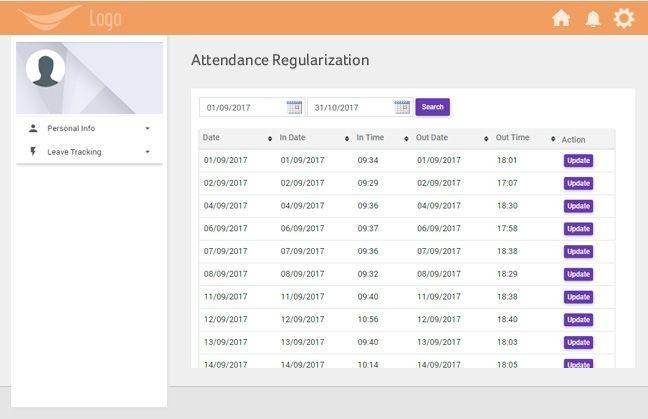
The Export Attendance Time Clock is a functionality that allows you to download all your time and attendance records from your time tracking system. You do not have to type out the data on the spreadsheet or payroll software; click one button, and you have all the information you require in a file format to utilize.
Consider it in the following way: your time clock gathers all the clock-in and clock-out information during the week or the month. You can use the time clock export attendance option at any time to generate payroll or other reports, pulling out all the necessary information in a structured format. You can then upload this file directly to your payroll system or open it in Excel for review.
### **Why Time Clock Export Attendance Matters**
If you're running a business with employees, you know that managing attendance data takes up valuable time. Here's why time clock export attendance features are so important:
Saves Time: Instead of spending hours entering data manually, you can export everything in seconds. What used to take an afternoon now takes just a few minutes.
Reduces Errors: When you type numbers by hand, mistakes happen. Maybe you miss a decimal point or enter the wrong hours. Time clock export attendance eliminates these human errors because the data goes directly from one system to another.
Makes Payroll Easier: Most businesses need to move attendance data into their payroll software. With time clock export attendance, you can download a file that works with your payroll system, making the whole process smooth and simple.
Keeps Records Organized: Exporting and saving attendance files gives you a backup of all your records. If there's ever a question about hours worked or a dispute with an employee, you have clear documentation.
### **Common Export Formats**
Different businesses need data in different ways. That's why good time tracking systems offer time clock export attendance in multiple formats. Here are the most common ones:
CSV Files: This is the most popular format. CSV stands for "comma-separated values," and these files open easily in Excel, Google Sheets, or most payroll software. They're simple, universal, and work with almost everything.
Excel Files: Some systems let you export directly to Excel format. These files often come with formatting already applied, making them easier to read right away.
PDF Reports: While you can't edit these, PDF exports are perfect for sharing with managers or keeping as permanent records. They look professional and can't be accidentally changed.
Custom Formats: Many payroll systems have their own specific formats. The best time clock export attendance tools can create files that match exactly what your payroll software needs.
### **How to Use Time Clock Export Attendance**
Using time clock export attendance features is usually straightforward, but let's walk through the basic process:
First, log into your time tracking system. Most modern systems, like[ Open Time Clock](https://www.opentimeclock.com/), have an easy-to-find export or reports section.
Next, choose your date range. You might want to export data for the past week, the current pay period, or the entire month. Select the dates that match your payroll schedule.
Then, select what data you want to include. Basic exports include employee names, dates, clock-in times, clock-out times, and total hours. Some systems also let you include break times, overtime hours, or project codes.
Choose your file format. As mentioned earlier, CSV is usually the safest choice because it works with almost everything. However, if your payroll software needs a specific format, select that option.
Finally, click the export button and download your file. The time clock export attendance process generates your file in seconds, and you can save it to your computer or upload it directly to your payroll system.
### **Features That Make Exporting Better**
Not all time clock export attendance features are created equal. Here are some advanced options that make data reporting even easier:
Automatic Scheduling: Some systems can automatically export your attendance data on a schedule. For example, you could set it to email you a CSV file every Friday afternoon with the week's data. This means you never have to remember to export manually.
Direct Integration: The best time tracking tools connect directly to popular payroll software. Instead of downloading and uploading files, the data transfers automatically.[ Open Time Clock](https://www.opentimeclock.com/) offers integrations that make this process seamless.
Custom Fields: Maybe you need to track department codes, job sites, or project numbers. Look for time clock export attendance features that let you include custom fields in your exports.
Filtered Exports: Instead of exporting everything, you might want data for just one department, location, or employee. Good systems let you filter before exporting so you get exactly what you need.
### **Solving Common Export Problems**
Even with the best time clock export attendance tools, you might run into issues. Here are solutions to common problems:
Problem: The exported file won't open in Excel. Solution: Make sure you're downloading the right format. Try CSV instead of Excel if you're having trouble. Also check that you're using a recent version of Excel.
Problem: The data looks wrong or incomplete. Solution: Double-check your date range settings. Make sure you selected all the employees you wanted to include. Verify that employees actually clocked in during that period.
Problem: Your payroll software won't accept the file. Solution: Contact your time tracking provider's support team. They can usually create a custom export format that matches exactly what your payroll system needs.
Problem: Numbers appear strange or formatted incorrectly. Solution: This often happens with time formats. Some systems export decimal hours (8.5 hours) while others use clock format (8:30). Check your export settings to change the time format.
### **Best Practices for Data Reporting**
To get the most from your time clock export attendance features, follow these simple practices:
Export Regularly: Don't wait until the last minute before payroll is due. Export data regularly to catch any problems early.[ Open Time Clock](https://www.opentimeclock.com/) makes this easy with quick export options.
Review Before Processing: Always take a few minutes to review your exported data before sending it to payroll. Look for anything unusual like extremely long shifts or missing time entries.
Keep Backups: Save your exported files in an organized folder on your computer or cloud storage. Name them clearly with dates so you can find them later. These backups are valuable if you ever need to verify old records.
Train Your Team: Make sure anyone who handles payroll knows how to use the time clock export attendance features. Write down the steps or create a quick guide so the process stays consistent.
Update Software Regularly: Time tracking systems improve their export features over time. Keep your software updated to access the latest improvements and bug fixes.
### **Choosing a System with Good Export Features**
When you're shopping for a time tracking system, pay close attention to the time clock export attendance options. Here's what to look for:
Does it export to the formats you need? Make sure it supports CSV at minimum, but ideally it should work with your specific payroll software.
Is the export process quick and easy? You don't want to click through ten screens just to download your data. The best systems make it simple with just a few clicks.
Can you customize what data gets exported? You should be able to choose which fields and information appear in your exported files.
Does it offer scheduled or automated exports? This feature saves even more time if you process payroll on a regular schedule.
Is there good support if you have problems? Sometimes you need help setting up custom exports or troubleshooting issues. Make sure the company offers solid customer support.
### **Conclusions**
Time clock export attendance features turn a tedious, error-prone task into something quick and simple. By choosing a time tracking system with strong export capabilities, you'll save hours every pay period and reduce mistakes that could cost you money.
The key is finding a system that exports data in the formats you need and makes the whole process as automatic as possible. Whether you have five employees or five hundred, good time clock export attendance tools make managing your workforce easier and give you more time to focus on growing your business.
### **FAQ’s**
#### **1. What does “Time Clock Export Attendance” mean?**
“Time Clock Export Attendance” means downloading or exporting employee attendance data (like clock-in and clock-out times) from your employee time tracking software. This lets managers quickly create reports for payroll, attendance reviews, or compliance purposes.
#### **2. Why is exporting attendance data important?**
Exporting attendance data saves time and reduces errors. Instead of manually entering hours into payroll or spreadsheets, you can export data directly from your time clock system making payroll and reporting much faster and more accurate.
#### **3. What file formats can I export attendance reports to?**
Most time clock software allows you to export attendance data in formats like CSV, Excel, or PDF. For example,[ OpenTimeClock](https://www.opentimeclock.com/?utm_source=chatgpt.com) lets you export attendance reports easily for use in payroll or other HR tools.
#### **4. How does exporting attendance data simplify reporting?**
When you export attendance data, you turn daily time records into clear, ready-to-use reports. Managers don’t have to calculate totals manually. Everything, total hours, overtime, absences, is already organized. This helps with payroll accuracy, compliance, and team performance tracking.
#### **5. Does exporting attendance data help with compliance?**
Absolutely. Accurate, exportable attendance data helps businesses follow labor laws, prove work hours, and avoid disputes. When you use reliable time clock software like[ ](https://www.opentimeclock.com/?utm_source=chatgpt.com)OpenTimeClock.
---
# Agent Instructions
This documentation is published with GitBook. GitBook is the documentation platform designed so that both humans and AI agents can read, navigate, and reason over technical content effectively. Learn more at gitbook.com.
## Querying This Documentation
If you need additional information that is not directly available in this page, you can query the documentation by asking a question.
Perform an HTTP GET request on the following URL with the `ask` and `goal` query parameters:
```
GET https://www.opentimeclock.com/docs/blog2/november-2025/time-clock-export-attendance-simplify-data-reporting.md?ask=&goal=
```
`ask` is the immediate question: it should be specific, self-contained, and written in natural language.
`goal` is what the user is ultimately trying to achieve, the reason they need the answer. Sharing it helps GitBook give you a better, more relevant answer. A goal is most helpful when it describes the outcome the user wants rather than restating the question. For example, with `ask=how do I create an API token`, a goal like `automate deployments from our CI pipeline` lets GitBook tailor the answer to that use case.
The response will contain a direct answer to the question and relevant excerpts and sources from the documentation.
Use this mechanism when the answer is not explicitly present in the current page, you need clarification or additional context, or you want to retrieve related documentation sections.