> For the complete documentation index, see [llms.txt](https://www.opentimeclock.com/docs/llms.txt). Markdown versions of documentation pages are available by appending `.md` to page URLs; this page is available as [Markdown](https://www.opentimeclock.com/docs/blog2/february-2026/opentimeclock-pricing-guide-2026-plans-features-and-is-pro-worth-it.md).
# OpenTimeClock Pricing Guide 2026: Plans, Features, & Is Pro Worth It?
Review OpenTimeClock pricing for Free, Paid, NPO, and Sponsor Link plans. Assess the features, price, and value of the Pro plan for your company.
## OpenTimeClock Pricing: Is the Pro Plan Worth It?
Potential customers for OpenTimeClock often begin by analyzing their pricing options. OpenTimeClock provides flexible time and[ attendance solutions with multiple features](https://subscribed.fyi/open-time-clock/reviews/), some free and others paid. In this article, I will dissect what each pricing option offers, how each pricing structure compares, and the types of organizations that should consider the paid options.
### Overview of OpenTimeClock Pricing Plans
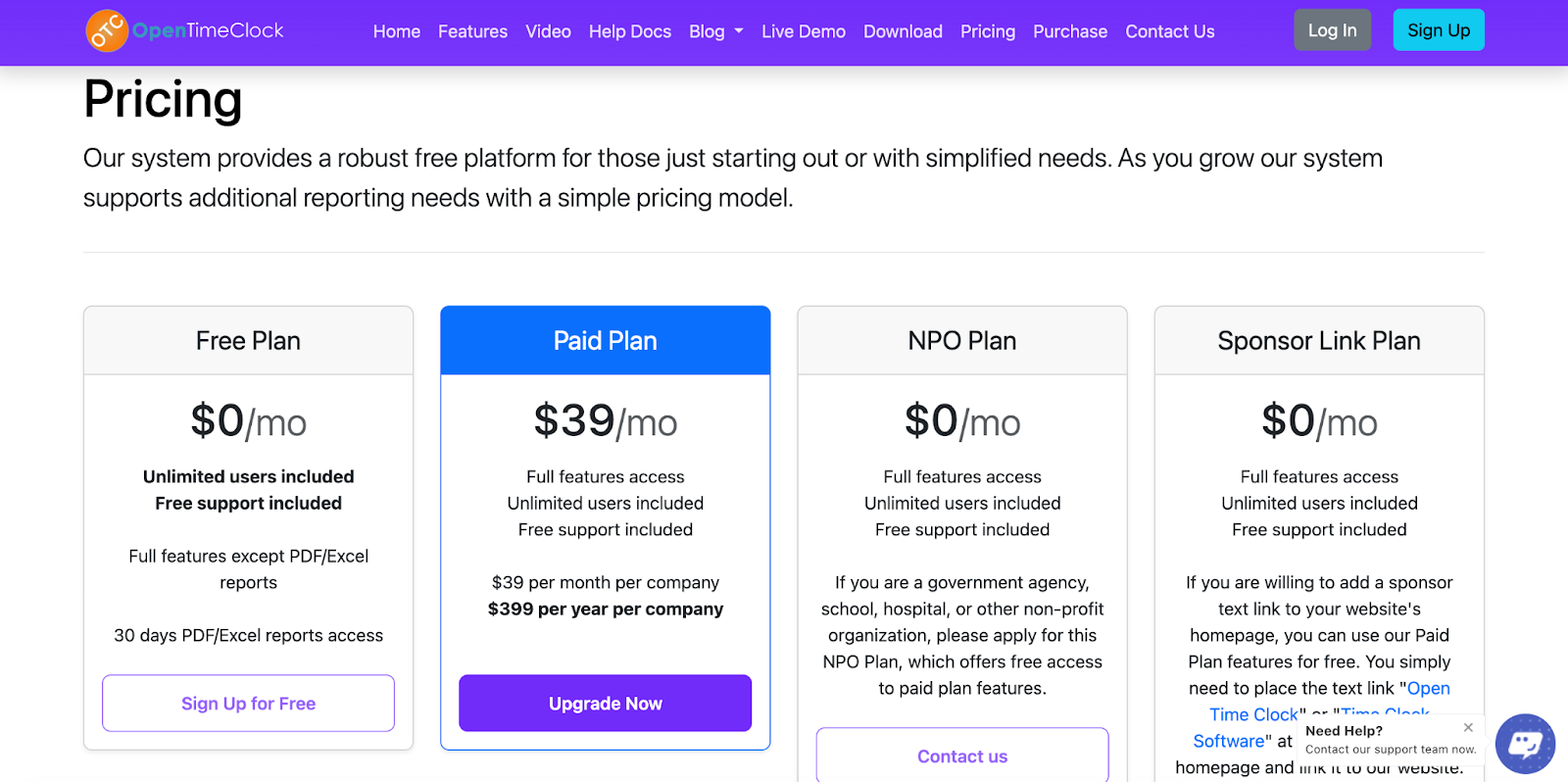
Pricing for OpenTimeClock offers numerous options organized by the consumer's specific budget and needs. The core plans that can be accessed from the provider's website include the following:
#### 1. Free Plan – $0/month
This Plan will always be[ free and include unlimited users](https://www.opentimeclock.com/docs/plan-pricing/free-plan) and basic time-tracking and attendance features. This option is suitable for small teams and startups with little demand. In the beginning, you will have 30 days of access to download the PDF/Excel reports, and after that, you will need to upgrade your Plan to download reports.
#### 2. Paid Plan – $39/month or $399/year
This is the standard paid Plan that unlocks all download features, including advanced scheduling, download receipts, notifications, GPS tracking, and more. Payments are made monthly for $39 per company or you can pay a year in advance at $399 to reduce your monthly payments.
#### 3. NPO Plan – $0/month for qualified organizations
If you represent an eligible non-profit, school, hospital, or government agency, you can apply for the NPO plan, which is free of charge. The Plan includes all the same features as the paid Plan. To apply, you must reach out to support to confirm eligibility.
#### 4. Sponsor Link Plan – $0/month
This Plan is unique in that it lets you access paid features at no cost by simply adding a small text link to OpenTimeClock on your site. Once the link is placed, you will reach out to support, and they will turn on paid-level access for you at no charge.
#### 5. Other Pricing Options
Some users encounter lite products or other pricing options that bundle features in different ways. Still, it mostly comes down to free and paid access, with other arrangements serving as secondary structures of the system.
All in all,[ OpenTimeClock has simple pricing](https://www.opentimeclock.com/pricing.html). Free access to core features, with full-featured plans available when more reporting and administrative control are needed.
### What You Get With Each Plan
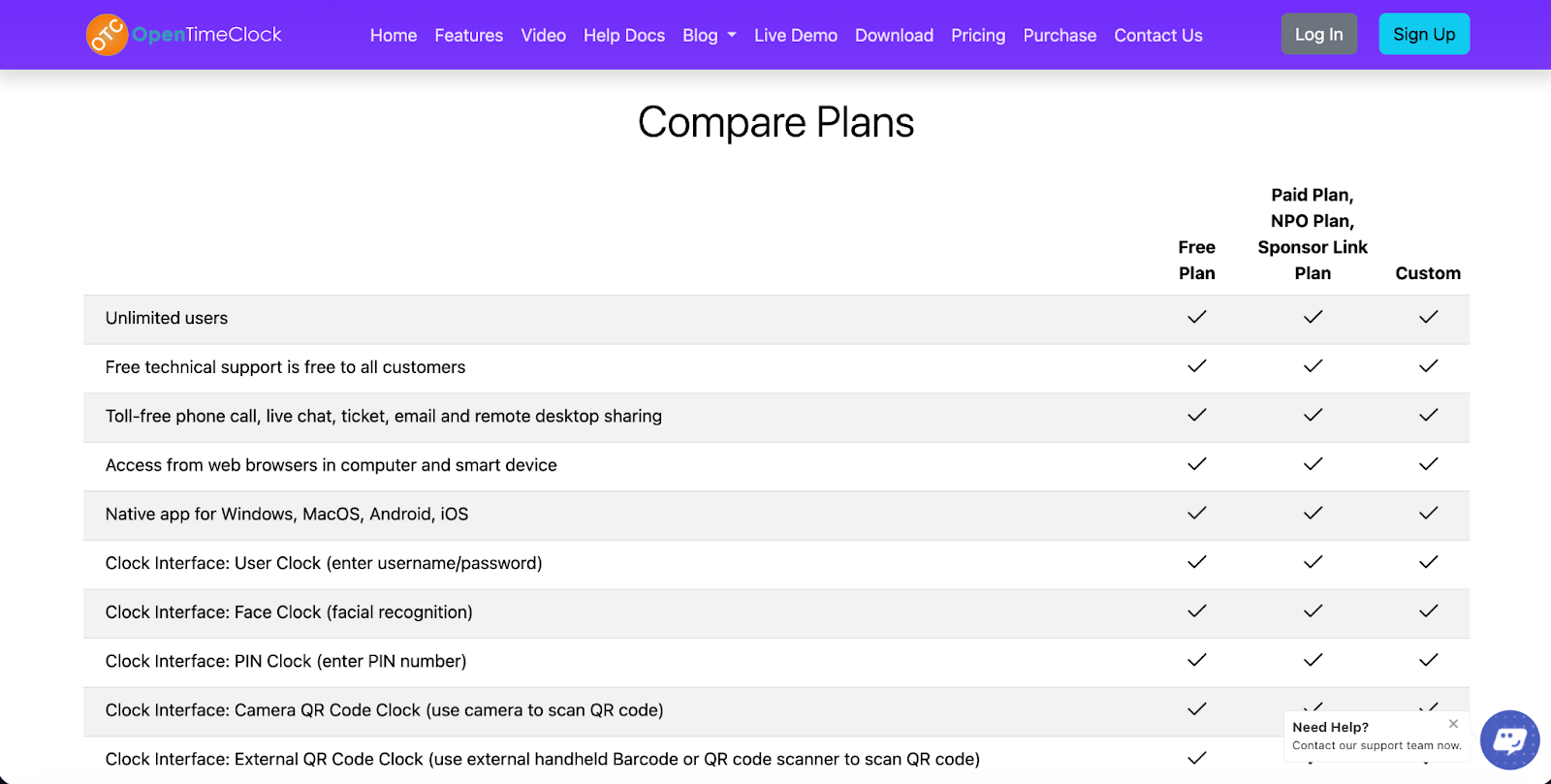
Highlighted across all pricing options with OpenTimeClock are features that extend far beyond simple manual timesheet functionality. Available options are summarized in the table below:
#### 1. Features by Plan: Free Plan
* Unlimited users
* Access via web or mobile
* Basic clock-in/out functions
* Basic history logging
* 30-day trial period for report export
* Support is available for free
#### 2. Features by Plan: Paid / Enhanced
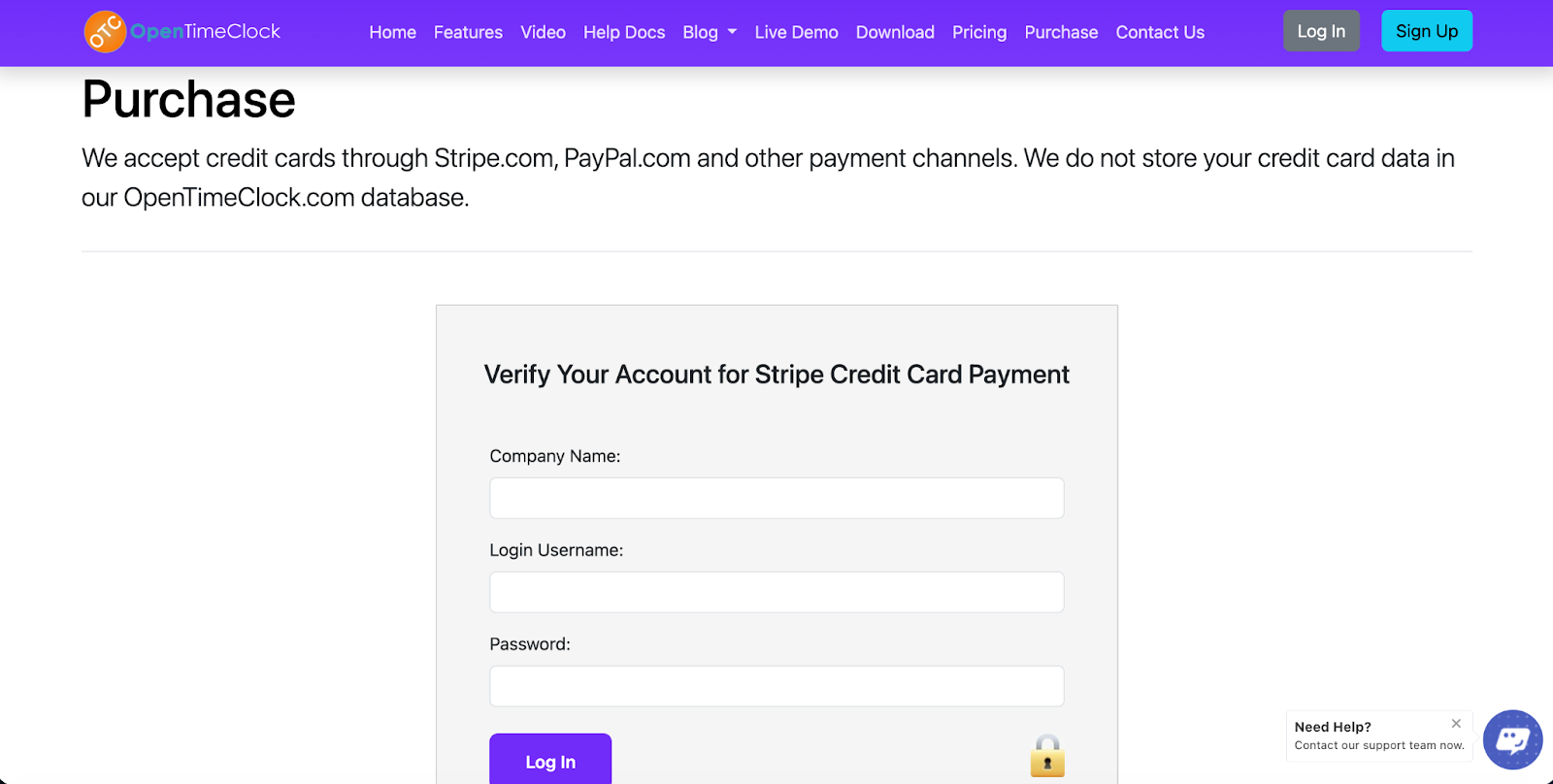
Once customers move up tiers on OpenTimeClock[ pricing to paid plans](https://www.opentimeclock.com/purchase.html) (or qualify for NPO or Sponsor Link plans), the following features are provided:
* Reports are exportable in PDF/Excel/CSV formats
* GPS-based location tracking
* Multiple clocking interface options (PIN, QR, face, group clocks)
* PTO accrual and approval tracking
* Scheduling and job assignment by shifts
* Management approval and edit locks
* Real-time attendance dashboards
* History storage up to 5 years available (with extensions)
* Notifications for missed or tardy punches
* Access to developer APIs
Considering the free and paid options that support unlimited users, the features offered here are far stronger than many time clock tools for small businesses.
### Comparing OpenTimeClock Pricing to Competitors
OpenTimeClock's pricing and its structure are often beneficial and cost-effective compared to its competitors' pricing, like Clockify and OnTheClock, because of the following points:
* A large number of competitors charge by the user and by the month, which often adds up quickly as teams grow.
* OpenTimeClock charges the company, so larger teams don't pay more per employee.
* A free plan with unlimited users and basic features is very uncommon in the time-tracking tool market.
* The Sponsor Link and NPO plans offer access to paid plan features without the ongoing costs.
* For small and mid-sized teams, this pricing structure provides better value by enabling cost containment as the organization expands.
### Pros and Cons of OpenTimeClock Pricing
Analyzing the advantages and disadvantages of the structure in real-world settings is beneficial before selecting a strategy.
#### Pros
1. OpenTimeClock is one of the very few time-tracking systems with a free plan that has no user limit. This makes it a great option for a growing team.
2. They also have pricing that is not based on the number of users, which is a benefit for large teams. Clients on the Enterprise pricing tier gain access to advanced features, including job and shift scheduling, detailed report exports in PDF, Excel, and CSV formats, PTO tracking, manager approval capabilities, real-time GPS tracking, and more.
3. Many competitors’ pricing models become exponentially more expensive as more people are added. Here, pricing is much more predictable. This is particularly useful for rapidly growing companies.
4. Unlike almost all time-tracking software providers, OpenTimeClock delivers real value to eligible organizations. Nonprofits, schools, and government organizations can access all features free of charge, and businesses with websites can gain access to paid features by adding a sponsor link to their site.
5. Even those who use the program for free can receive support. Other software companies limit support to paying customers, so this is a significant benefit for smaller teams that might occasionally need help.
6. No tiers with complicated features and add-ons that keep changing. You use the free version, or you switch to the paid version for straightforward access to everything.
#### Cons
1. Basic core tracking is available for free. Users can only export detailed tracking reports after paying for an upgrade. Businesses that rely on payroll reporting or accounting exports will most likely have to upgrade sooner than expected due to this restriction.
2. To have free paid-level access under the Sponsor Link plan, you must have an active, visible link to your site. If you remove the link, you may lose eligibility. This may not align with the preferences of businesses that do not want external branding on their site.
3. Annual billing, while it may lower the effective monthly cost, requires paying the full year's amount in advance. This is likely a significant consideration for small businesses, given the tight control over their cash flow.
4. If you operate on a high volume of compliance reporting or analytics, upgrading is a must, since the free plan provides none of the extended data analytics or the additional administrative, API, storage, and export reporting controls.
### Who Should Consider Each Plan
Selecting an appropriate plan depends on your organization’s size, reporting requirements, compliance needs, and future growth strategy. Below, we clarify which options suit which organizations.
#### 1. Free Plan
The Free Plan is suitable for small teams, startups, freelancers, and early-stage businesses, as it meets basic needs by only offering time-tracking capabilities with no advanced administrative features. If your goal is to have your employee’s clock in and out, check attendance, and have basic internal tracking, this plan will be sufficient.
It is also a viable option if you are assessing the software. As there are no costs or user limits, you can trial it with your entire staff to help determine whether advanced reporting or scheduling is needed. Free plans typically suit businesses with uncomplicated payroll needs or no need for regular, exportable reports.
#### 2. Paid Plan
The Paid Plan is more applicable to growing businesses and established companies that need more formal workforce management. The need to manage operations such as shift scheduling, PTO accrual tracking, manager approvals, job tracking, GPS tracking, and regular payroll exports makes upgrading to this plan necessary.
The paid plan's export capabilities will allow such firms to receive reports in a preferred format for accounting, compliance, or payroll processing. They will benefit organizations that require such reporting for one or more associated divisions/locations, especially when visibility into reporting, approval, and audit reports is needed. Since reporting is done by the company rather than headcount, larger organizational structures are likely to benefit more from this pricing model than other models based on active users.
#### 3. NPO Plan
The NPO Plan is best suited for registered nonprofits, educational institutions, healthcare institutions, and government agencies that require full workforce management functionalities but have budgetary constraints. These organizations need to implement formal time-and-attendance systems for compliance and reporting, but funding is limited.
This plan provides a subscription-free way for qualifying organizations to access paid features. For such institutions, this is a viable alternative that provides compliance reporting, scheduling, and administrative features without adding to the operational budget.
#### 4. Sponsor Link Plan
The Sponsor Link Plan is an accessible option for business or agency owners who control a public website. By adding a simple sponsor text link, they receive all the features of the paid plan without paying a subscription fee
This approach is especially beneficial for digital agencies, consultants, service providers, or businesses that are okay with showing a minor external link. If having that link isn't a problem for your brand, it can be a clever way to leverage advanced time-tracking features while keeping costs at zero.
### Is the Pro (Paid) Plan Worth the Upgrade?
When weighing the potential benefits of upgrading, consider the value of having reporting/controls/automation in the function of your business.
While some very small teams may find the free plan sufficient, the advantages are quickly overshadowed by the volume and consistency challenges created by payroll accuracy, compliance, and internal accountability constraints. Because the free version cannot export long-term reports, users will create manual workarounds that are time-consuming and increase the risk of errors.
The paid plan solves those problems. Complete your reporting and payroll processing by seamlessly exporting data in structured reports and processed payrolls as needed in PDF, Excel, and CSV formats. The inclusion of managerial approval work streams minimizes time entry disputes. Leave balances will be accurately calculated by the included PTO accrual tracking. Remote and field employees will have greater accountability, with the ability to clock in via various methods, including GPS tracking.
### Conclusion
What is the true nature of OpenTimeClock pricing?
The OpenTimeClock pricing structure is among the most flexible in the time-tracking software field. Starting with a free plan, the software is very accessible, especially for small companies, as it supports unlimited users, meaning a company can use it without any initial cost. Moving on to the paid plan, companies receive a full-scale time management toolset (which includes more than just simple clock-ins).
New to the features, the NPO and Sponsor Link plans can even provide complete access to all paid plan features if you qualify. For teams that require complete reporting, scheduling, PTO, and geofencing without complex per-user pricing, the OpenTimeClock pricing model is a must.
### FAQ’s
#### What does the free plan include?
The paid plan includes a free time-tracking feature, browser and mobile time-tracking features, and 30 days of report export access. If you do not need to do frequent downloads and you do not require advanced scheduling, this may be all you require
#### Is the paid plan just $39/month?
Yes. The standard paid plan is $39 per month per company. If you are billed annually, the fee is $399. This gives you access to all reporting and advanced features.
#### What is the operation model for NPO & Sponsor Link plans?
Nonprofit organizations qualify for free, full access. Other eligible businesses with a public website can obtain paid features at no charge by adding a sponsor link.
#### Is it possible to change plans?
Certainly, changing plans is possible at any time. You can move from the free plan to a paid plan. You can also change plans to NPO or Sponsor Link plans based on eligibility.
#### Are there any hidden costs?
Pricing with OpenTimeClock is clear and direct. There are no user-based fees and no hidden costs for the plan you choose. All plans include support, and there are no additional costs.
---
# Agent Instructions
This documentation is published with GitBook. GitBook is the documentation platform designed so that both humans and AI agents can read, navigate, and reason over technical content effectively. Learn more at gitbook.com.
## Querying This Documentation
If you need additional information that is not directly available in this page, you can query the documentation by asking a question.
Perform an HTTP GET request on the following URL with the `ask` and `goal` query parameters:
```
GET https://www.opentimeclock.com/docs/blog2/february-2026/opentimeclock-pricing-guide-2026-plans-features-and-is-pro-worth-it.md?ask=&goal=
```
`ask` is the immediate question: it should be specific, self-contained, and written in natural language.
`goal` is what the user is ultimately trying to achieve, the reason they need the answer. Sharing it helps GitBook give you a better, more relevant answer. A goal is most helpful when it describes the outcome the user wants rather than restating the question. For example, with `ask=how do I create an API token`, a goal like `automate deployments from our CI pipeline` lets GitBook tailor the answer to that use case.
The response will contain a direct answer to the question and relevant excerpts and sources from the documentation.
Use this mechanism when the answer is not explicitly present in the current page, you need clarification or additional context, or you want to retrieve related documentation sections.