Day View
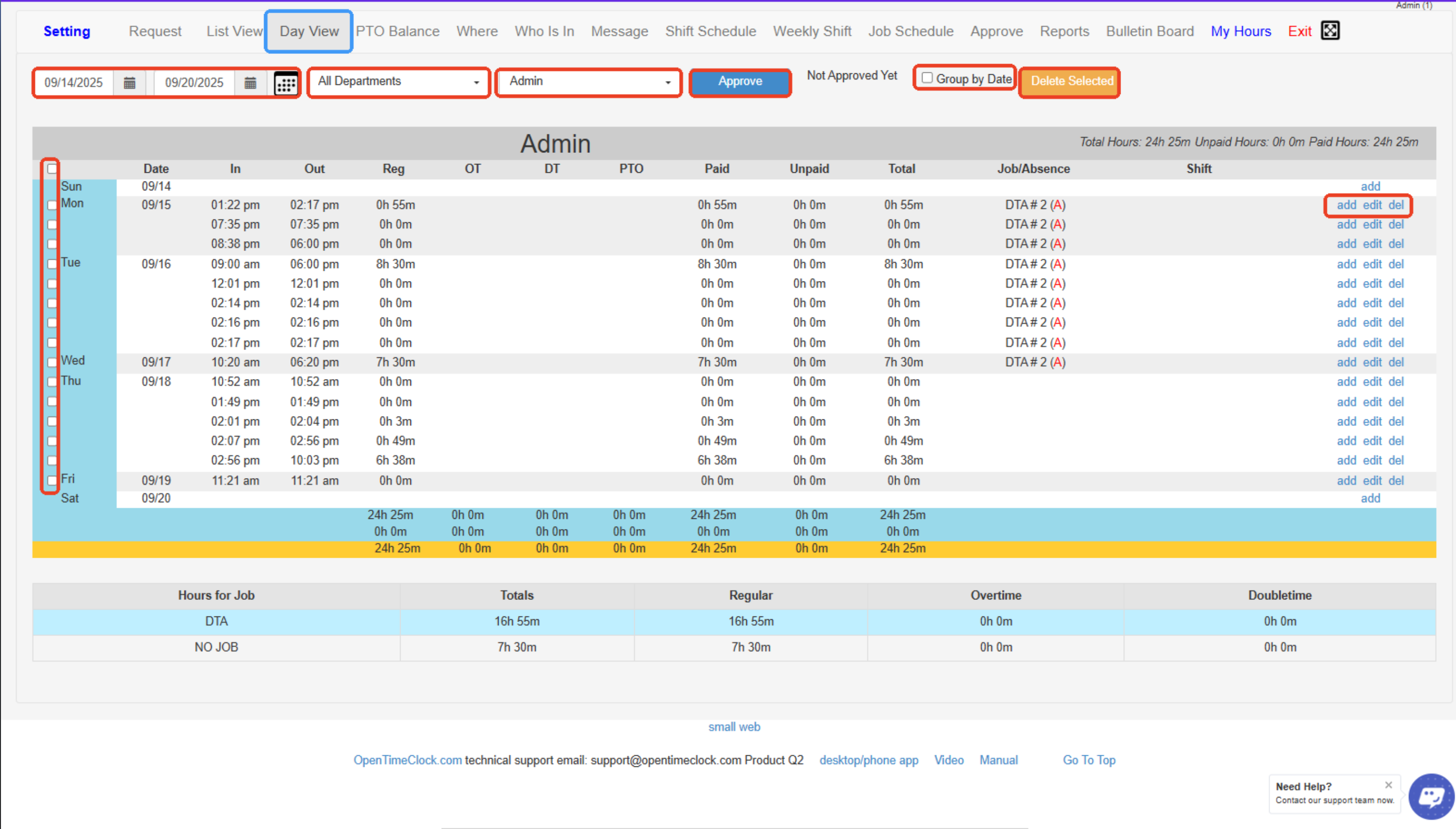
Day View displays employee time records for a single day, allowing managers to easily review, edit, or add clock-in/clock-out entries, absences, and shift details for that specific date.
- Date Range Selector- Choose the start and end dates to display time entries within a selected period.
- Department Filter- Filter employees by department to view only relevant staff records.
- Employee Selector- Select a specific employee to view their daily time records.
- Approve Button- Approve selected time entries directly from the Day View screen.
- Group by Date Checkbox- Toggle to group records by date for easier review.
- Delete Selected Button- Delete multiple selected time entries at once.
- Selection Checkboxes- Check boxes next to each entry to approve or delete multiple records at once.
- Add / Edit / Delete Links- Manage individual time entries — add new, edit existing, or delete unwanted entries.
- Daily Totals Row- Shows total hours (paid, unpaid, overtime, etc.) calculated for each day at the bottom of the table.
- Hours for Job Summary Table- Breakdown of total hours worked per job and category (regular, overtime, double time).
Created with the Personal Edition of HelpNDoc: Ensure High-Quality Documentation with HelpNDoc's Hyperlink and Library Item Reports