API for Product Q2
Your developers can use this API to query time hours data and users profile data from your account in product Q2.
1. Query Time Cards data:
Sample Code to query time cards data by passing parameters in URL:
Sample Code to query time cards data in JavaScript with jQuery POST:
function post(data, handler) {
var url = "https://api1.opentimeclock.com/Jun-Inside-VPC"; //api url
$.post(url, JSON.stringify(data), handler, 'json');
}
function getTimeCards() {
//pass in JSON parameters:
post({
"cmd": "api/q2QueryTimeCards", //This passed in commmand means query time cards records. We may have add or modify command later.
"companyId": "xxxx", //Find your "Company ID" in company setting page.
"developerToken": "xxxx", //Find "Developer Token" in reports page with admin account
"nextRecord": "0", //Default to "0". If >"0" means query the left data when there are more than 5k records available.
"dateTimeFrom": "2022-05-01 00:00:00", //From Date Time format: 0000-00-00 00:00:00
"dateTimeTo": "2022-05-15 23:59:59", //To Date Time format: 0000-00-00 00:00:00
"userFullName": "xxxx", //sample: Elon Musk; For all users, use "ALL USERS" or ""
"departmentName": "xxxx", //sample: HR Department; For all departments, use "ALL DEPARTMENTS",or ""
"maxRecords": "5000", //Default to "5000" if set as "". How many maximum records be return in each query.
"returnColumns": "" //set return columns, format as "$columnName1$columnName2$columnName3...$columnNameX"; sample is "$userFullName$employeeNumber$inDateTime". For all columns, use "ALL COLUMNS",or ""
}, function (result) {
//sample code to use returned data:
var statusCode = result.statusCode;
var message = result.message;
var nextRecord = result.nextRecord;
var dataSet = result.data;
if(statusCode == 'SUCCESS')
console.log('query data successfully.');
if(statusCode == 'ERROR')
console.log('query data failed. check returned message.');
if(nextRecord == '-1')
console.log('no more data left');
if(nextRecord != '-1')
console.log('there are more data left. pass in nextRecord to query more.');
//use data set like this:
var firstFullName=dataSet[0].userFullName;
});
}
Sample Code to query time cards data in PHP:
header("Content-type:application/json;charset=utf-8");
$url="https://api1.opentimeclock.com/Jun-Inside-VPC";
$param=array(
"cmd" => "api/q2QueryTimeCards", //This passed in commmand means query time cards records. We may have add or modify command later.
"companyId" => "xxxx", //Find your "Company ID" in company setting page.
"developerToken" => "xxxx", //Find "Developer Token" in reports page with admin account
"nextRecord" => "0", //Default to "0". If >"0" means query the left data when there are more than 5k records available.
"dateTimeFrom" => "2022-05-01 00:00:00", //From Date Time format: 0000-00-00 00:00:00
"dateTimeTo" => "2022-05-15 23:59:59", //To Date Time format: 0000-00-00 00:00:00
"userFullName" => "xxxx", //sample: Elon Musk; For all users, use "ALL USERS" or ""
"departmentName" => "xxxx", //sample: HR Department; For all departments, use "ALL DEPARTMENTS",or ""
"maxRecords" => "5000", //Default to "5000" if set as "". How many maximum records be return in each query.
"returnColumns" => "" //set return columns, format as "$columnName1$columnName2$columnName3...$columnNameX"; sample is "$userFullName$employeeNumber$inDateTime". For all columns, use "ALL COLUMNS",or ""
);
$data = json_encode($param);
$postdata=str_replace("\\/", "/", $data);
list($return_code, $return_content) = http_post_data($url, $postdata);
print_r($return_content);exit;
function http_post_data($url, $data_string) {
$ch = curl_init();
curl_setopt($ch, CURLOPT_POST, 1);
curl_setopt($ch, CURLOPT_URL, $url);
curl_setopt($ch, CURLOPT_POSTFIELDS, $data_string);
curl_setopt($ch, CURLOPT_HTTPHEADER, array(
"Content-Type: application/json; charset=utf-8",
"Content-Length: " . strlen($data_string))
);
ob_start();
curl_exec($ch);
$return_content = ob_get_contents();
ob_end_clean();
$return_code = curl_getinfo($ch, CURLINFO_HTTP_CODE);
return array($return_code, $return_content);
}
Sample returned data in JSON to query time cards data:
{
"statusCode": "SUCCESS", //ERROR
"message": "", //Company ID not found. Developer token is not correct. User Full Name not found. Department Name not found.
"nextRecord": "-1", //if ="-1", means no more data left, otherwise please query left data from this number.
"data":
[
{
"userFullName": "Elon Musk",
"employeeNumber": "12345",
"userName": "elonmusk",
"digitId": "123456",
"inDateTime": "2021-05-27 08:49:00", //clock in date time or start date time
"outDateTime": "2021-05-27 18:35:00", //clock out time //not applicable = 0000-00-00 00:00:00
"hours": "0.000", //not applicable if entryType=0 (job)
"entryType":0, //0=job; 1=pto, 2=addition adjustment, 3=deduction adjustment
"adjustHoursAmount": "0", //0=hours, 1=amount, //only for entryType=2 or 3
"jobName": "job 1",
"ptoName": "vacation",
"adjustTypeName": "",
"shiftName": "day shift",
"employeeNote": "",
"employeeNoteDateTime": "",
"employeeNoteIsRead": "",
"managerComment": "",
"managerCommentDateTime": "",
"managerCommentManagerFullName": "",
"managerCommentIsRead": "",
"inIp": "",
"outIp": "",
"inDeviceId": "",
"outDeviceId": "",
"inWifiId": "",
"outWifiId": "",
"inLatitude": "",
"inLongitude": "",
"outLatitude": "",
"outLongitude": "",
"entranceIn": "",
"entranceOut: "",
"approvedByEmployee": 0; //0=NO, 1=YES
"approvedManagerFullName": "", //empty means not approved yet
"updateDateTime": "2021-05-27 18:35:00", //our server time, record last updated. Amazon.com aws North Virginia.
"createdDateTime": "2021-05-27 08:49:00" //our server time, record first created. Amazon.com aws North Virginia.
},
{
//other records the same format.
}
]
}
2. Query Users data:
Sample Code to query users' data by passing parameters in URL:
Sample Code to query users' data in JavaScript with jQuery POST:
function post(data, handler) {
var url = "https://api1.opentimeclock.com/Jun-Inside-VPC"; //api url
$.post(url, JSON.stringify(data), handler, 'json');
}
function getUsers() {
//pass in JSON parameters:
post({
"cmd": "api/q2QueryUsers", //This passed in commmand means query users records. We may have add or modify command later.
"companyId": "xxxx", //Find your "Company ID" in company setting page.
"developerToken": "xxxx", //Find "Developer Token" in reports page with admin account
"nextRecord": "0", //Default to "0". If >"0" means query the left data when there are more than 5k records available.
"createdDateTimeFrom": "2022-05-01 00:00:00", //From Date Time format: 0000-00-00 00:00:00
"createdDateTimeTo": "2022-05-15 23:59:59", //To Date Time format: 0000-00-00 00:00:00
"updatedDateTimeFrom": "2022-05-01 00:00:00", //From Date Time format: 0000-00-00 00:00:00
"updatedDateTimeTo": "2022-05-15 23:59:59", //To Date Time format: 0000-00-00 00:00:00
"userFullName": "xxxx", //sample: Elon Musk; For all users, use "ALL USERS" or ""
"departmentName": "xxxx" //sample: HR Department; For all departments, use "ALL DEPARTMENTS",or ""
"role": "xxxx" //sample: Admin; Options include Admin, Manager, Employee, Inactive, ALL ROLES. For all roles, use "ALL ROLES",or ""
}, function (result) {
//sample code to use returned data:
var statusCode = result.statusCode;
var message = result.message;
var nextRecord = result.nextRecord;
var dataSet = result.data;
if(statusCode == 'SUCCESS')
console.log('query data successfully.');
if(statusCode == 'ERROR')
console.log('query data failed. check returned message.');
if(nextRecord == '-1')
console.log('no more data left');
if(nextRecord != '-1')
console.log('there are more data left. pass in nextRecord to query more.');
//use data set like this:
var firstFullName=dataSet[0].userFullName;
});
}
Sample Code to query users' data in PHP:
header("Content-type:application/json;charset=utf-8");
$url="https://api1.opentimeclock.com/Jun-Inside-VPC";
$param=array(
"cmd" => "api/q2QueryUsers", //This passed in commmand means query users records. We may have add or modify command later.
"companyId" => "xxxx", //Find your "Company ID" in company setting page.
"developerToken" => "xxxx", //Find "Developer Token" in reports page with admin account
"nextRecord" => "0", //Default to "0". If >"0" means query the left data when there are more than 5k records available.
"createdDateTimeFrom" => "2022-05-01 00:00:00", //From Date Time format: 0000-00-00 00:00:00
"createdDateTimeTo" => "2022-05-15 23:59:59", //To Date Time format: 0000-00-00 00:00:00
"updatedDateTimeFrom" => "2022-05-01 00:00:00", //From Date Time format: 0000-00-00 00:00:00
"updatedDateTimeTo" => "2022-05-15 23:59:59", //To Date Time format: 0000-00-00 00:00:00
"userFullName" => "xxxx", //sample: Elon Musk; For all users, use "ALL USERS" or ""
"departmentName" => "xxxx" //sample: HR Department; For all departments, use "ALL DEPARTMENTS",or ""
"role" => "xxxx" //sample: Admin; Options include Admin, Manager, Employee, Inactive, ALL ROLES. For all roles, use "ALL ROLES",or ""
);
$data = json_encode($param);
$postdata=str_replace("\\/", "/", $data);
list($return_code, $return_content) = http_post_data($url, $postdata);
print_r($return_content);exit;
function http_post_data($url, $data_string) {
$ch = curl_init();
curl_setopt($ch, CURLOPT_POST, 1);
curl_setopt($ch, CURLOPT_URL, $url);
curl_setopt($ch, CURLOPT_POSTFIELDS, $data_string);
curl_setopt($ch, CURLOPT_HTTPHEADER, array(
"Content-Type: application/json; charset=utf-8",
"Content-Length: " . strlen($data_string))
);
ob_start();
curl_exec($ch);
$return_content = ob_get_contents();
ob_end_clean();
$return_code = curl_getinfo($ch, CURLINFO_HTTP_CODE);
return array($return_code, $return_content);
}
Sample returned data in JSON to query users' data:
{
"statusCode": "SUCCESS", //ERROR
"message": "", //Company ID not found. Developer token is not correct. User Full Name not found. Department Name not found. Role not found.
"nextRecord": "-1", //if ="-1", means no more data left, otherwise please query left data from this number.
"data":
[
{
"userFullName": "Elon Musk",
"userName": "elonmusk",
"digitId": "123456",
"employeeNumber": "12345",
"email": "sample@opentimeclock.com",
"mobilePhone": "",
"role": "Admin", //Admin, Manager, Employee, Inactive
"updatedDateTime": "2021-05-27 08:49:00",//our server time, record last updated. Amazon.com aws North Virginia.
"createdDateTime": "2021-05-27 08:49:00",//our server time, record first created. Amazon.com aws North Virginia.
"overTimeRule": "ot1",
"departmentName": "HR department",
"hiredDate": "2021-05-01",
"fullPartTime": "Full Time", //Full Time, Part Time
"rateType": "Hourly Rate", //Hourly Rate, Salary Rate
"payRate": "0.00",
"timeZone":"America/New_York",
"pointOfContact": "",
"dateOfBirth":"1997-02-20",
"memo":""
},
{
//other records the same format.
}
]
}
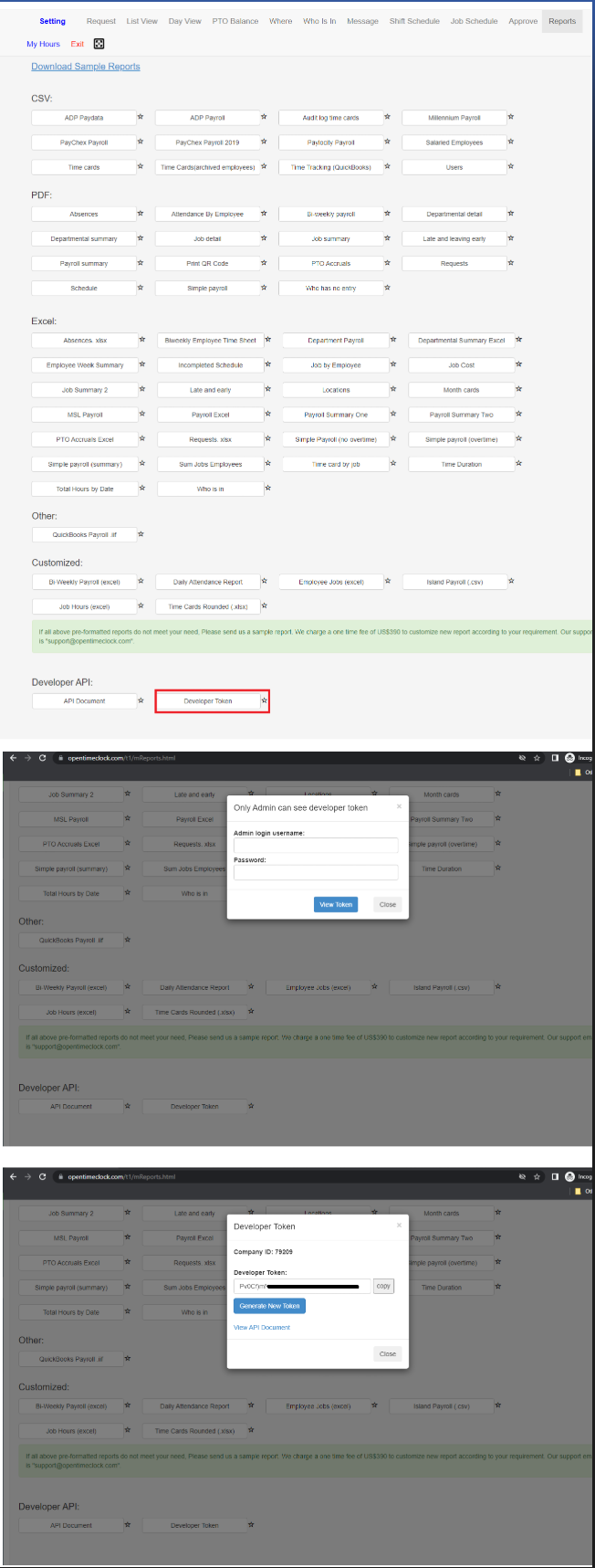
Where to find Developer Token:
Created with the Personal Edition of HelpNDoc: Transform Your Word Document into a Professional eBook with HelpNDoc