Punch Audit
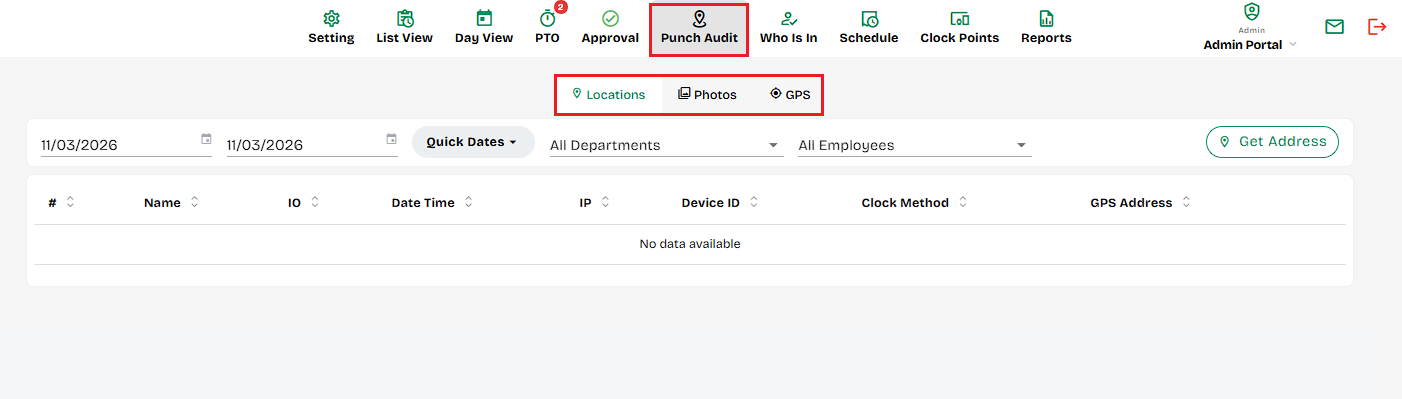
Where shows the locations or devices where employees clock in and out, helping managers monitor attendance locations, verify shifts, and ensure accurate time tracking by place.
1. Locations / Photos / GPS Tabs
Switch between three views:
- Locations: Lists where employees clocked in/out.
- Photos: Shows clock-in/out photos.
- GPS: Displays GPS map locations of punches.
- Date Range Selector- Filter clock-in and clock-out records within a chosen start and end date.
- Department Filter- Dropdown to display records for all departments or a specific department.
- Employee Filter- Dropdown to display records for all employees or a specific employee.
- Get Address Button- Converts GPS coordinates into readable addresses for selected punches.
- Get Address Link- Click to fetch and display the exact location address for the GPS coordinates shown.
Created with the Personal Edition of HelpNDoc: Easily create Help documents